
Sunday, 8 July 2012
Count Checked Rows in a Tabular Form
This is a quite simple but still frequently asked question. Here is an example on how to count checked rows in a tabular form. You may need this functionality prior to processing. For example, if you want to inform your user that they didn't select any rows after pressing the "Delete" button.
http://apex.oracle.com/pls/otn/f?p=31517:281


Thursday, 28 June 2012
Text Area with Character Counter in a Tabular Form
This small example shows how to create a textarea in a tabular form with a character counter, similar to the one for the page item of type "Textarea":
http://apex.oracle.com/pls/otn/f?p=31517:276


APEX Tabular Form and ORA-01403: no data found
If you get the "ORA-01403: no data found" error after running your code while updating or validating a tabular form, you will need to find out which array is causing it. This error occurs if the referenced array does not exist - apex_application.g_f01..g_f50. For example, if you use a PL/SQL block similar to this:
1. Firefox
2. Firebug
Activate the firebug and use the HTML option to go over the elements (columns) in your tabular form. Firebug will show the associated array number and you can use that information to correct you code.

DECLARE
   vrow   BINARY_INTEGER;
BEGIN
   FOR i IN 1 .. apex_application.g_f01.COUNT
   LOOP
      vrow := apex_application.g_f01 (i);

      UPDATE dept
         SET dname = apex_application.g_f04 (vrow),
             loc = apex_application.g_f05 (vrow)
       WHERE empno = apex_application.g_f02 (vrow);
   END LOOP;
END;
The easiest way to debug is to use:
1. Firefox
2. Firebug
Activate the firebug and use the HTML option to go over the elements (columns) in your tabular form. Firebug will show the associated array number and you can use that information to correct you code.

Sunday, 24 June 2012
Comparing Strings
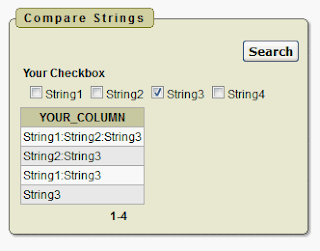
I just received an interesting question regarding report filtering. The problem was the following:
1. There was a checkbox with multiple choices in the form.
2. The data would be saved as a concatenated string of values (String1:String2:String3).
3. The problem was in filtering that column since the filter would also be the same checkbox containing multiple values.
The solution for that is quite simple. All you need to do is to create a function which will compare the two strings and return something if it finds a match.
CREATE OR REPLACE FUNCTION compare_checkbox_strings (
   p_checkbox   IN   VARCHAR2,
   p_column     IN   VARCHAR2
)
   RETURN NUMBER
IS
   l_vc_arr2   apex_application_global.vc_arr2;
   v_count     NUMBER;
BEGIN
   l_vc_arr2 := apex_util.string_to_table (p_checkbox);

   FOR i IN 1 .. l_vc_arr2.COUNT
   LOOP
      EXIT WHEN v_count > 0;
      v_count := INSTR (':' || p_column || ':', ':' || l_vc_arr2 (i) || ':');
   END LOOP;

   IF v_count > 0
   THEN
      RETURN 1;
   ELSE
      RETURN 0;
   END IF;
END compare_checkbox_strings;
Now, you can use it in your SQL Query like this:
SELECT *
  FROM your_table
 WHERE compare_checkbox_strings (:p1_your_checkbox, your_column) = 1;
You can find a working example here: http://apex.oracle.com/pls/otn/f?p=31517:275

Monday, 18 June 2012
BLOB over DB Link
Using a DB Link to query BLOB's from a remote database could be a problem. Recently, I had to show images comming from a remote server in an APEX application. Selecting from a remote table would result in an error. Creating a copy of the remote table by issuing the following statement worked without any problems:
After searching for a solution I found an interesting way to get it working:
Jiri's Microblog
Basically, all you need to do is to:
1. create a local copy of the table you get the data from as
2. create two types for storing the information
3. create a pipelined function to get the required row
Now, selecting from the function using the following SQL:
will get that BLOB for you.
INSERT INTO dbt_images
   SELECT *
     FROM dbt_images@remote_db
    WHERE ID = p_id;
After searching for a solution I found an interesting way to get it working:
Jiri's Microblog
Basically, all you need to do is to:
1. create a local copy of the table you get the data from as
CREATE TABLE dbt_images AS
   SELECT *
     FROM dbt_images@remote_db
     WHERE 1 = 2;
2. create two types for storing the information
CREATE OR REPLACE TYPE object_row_type AS OBJECT (
   ID        NUMBER,
   NAME      VARCHAR2 (256),
   image     BLOB,
   creator   NUMBER,
   created   DATE
);
/
CREATE OR REPLACE TYPE object_table_type AS TABLE OF object_row_type;
/
3. create a pipelined function to get the required row
CREATE OR REPLACE FUNCTION get_remote_blob (p_id IN NUMBER)
   RETURN object_table_type PIPELINED
IS
   PRAGMA AUTONOMOUS_TRANSACTION;
BEGIN
   INSERT INTO dbt_images
      SELECT *
        FROM dbt_images@remote_db
       WHERE ID = p_id;

   COMMIT;

   FOR cur IN (SELECT ID, NAME, image, creator, created
                 FROM dbt_images)
   LOOP
      PIPE ROW (object_row_type (cur.ID,
                                 cur.NAME,
                                 cur.image,
                                 cur.creator,
                                 cur.created
                                ));
   END LOOP;

   DELETE FROM dbt_images
         WHERE ID = p_id;

   COMMIT;
   RETURN;
END get_remote_blob;
/
Now, selecting from the function using the following SQL:
SELECT ID, image, NAME, DBMS_LOB.getlength (image)
  FROM TABLE (getblob (p_id));
will get that BLOB for you.
Monday, 19 December 2011
APEX 4.0 / 4.1 New Features
Our next training is scheduled for March 2012. You can find the deatils on www.opal-consulting.de.
-------------------------------------------------------------------------------------
Wir (Denes Kubicek und Dietmar Aust) freuen uns, das nächste APEX Training bekannt geben zu können.
Es findet am 26.03.2012 bis zum 27.03.2012 erneut in Bensheim bei Frankfurt statt, im Aleehotel.
Nutzen Sie das Wissen und die Erfahrung von
* Dietmar Aust, erfahrener Oracle Consultant mit Spezialisierung auf Oracle Apex, aktiv in den OTN Foren zu Apex und Oracle XE, mit Präsentationen auf den letzten DOAG Veranstaltungen und
* Denes Kubicek, langjährige Projekterfahrung in den Bereichen Oracle und APEX mit multisite Applikationen, Preisträger des "Oracle APEX Developer of the Year 2008" Awards des Oracle Magazines, ein Oracle ACE Director und sehr bekannt im Oracle APEX OTN Forum für seine Beispielapplikation,
um die Nuntzung von APEX 4.0 und 4.1 New Features aus vielen erfolgreichen APEX Projekten zu lernen.
Neben einer Fülle an Informationen, die wir in vielen erfolgreichen APEX Projekten erarbeitet haben, sind insbesondere die abendlichen Sessions (von 19:00-21:00) als Highlight zu nennen.
Dort stehen wir Ihnen für zusätzliche Hands-On Sessions zur Verfügung, um die Beispiele des Tages durchzuarbeiten oder auch, um konkrete Fragestellungen in Ihren aktuellen Projekten zu diskutieren.
Weitere Details zum Kurs sowie die Anmeldung finden Sie auf www.opal-consulting.de.
Wir freuen uns, dieses Mal Peter Raganitsch als Gastredner bei uns im Kurs zu haben. Er ist in der APEX Community ebenfalls sehr bekannt und hält regelmäßig Vorträge zur Oracle APEX. Er wird das Thema "Mobile APEX: Anwendungen für Smartphones und Tablets entwickeln" behandeln.

-------------------------------------------------------------------------------------
Wir (Denes Kubicek und Dietmar Aust) freuen uns, das nächste APEX Training bekannt geben zu können.
Es findet am 26.03.2012 bis zum 27.03.2012 erneut in Bensheim bei Frankfurt statt, im Aleehotel.
Nutzen Sie das Wissen und die Erfahrung von
* Dietmar Aust, erfahrener Oracle Consultant mit Spezialisierung auf Oracle Apex, aktiv in den OTN Foren zu Apex und Oracle XE, mit Präsentationen auf den letzten DOAG Veranstaltungen und
* Denes Kubicek, langjährige Projekterfahrung in den Bereichen Oracle und APEX mit multisite Applikationen, Preisträger des "Oracle APEX Developer of the Year 2008" Awards des Oracle Magazines, ein Oracle ACE Director und sehr bekannt im Oracle APEX OTN Forum für seine Beispielapplikation,
um die Nuntzung von APEX 4.0 und 4.1 New Features aus vielen erfolgreichen APEX Projekten zu lernen.
Neben einer Fülle an Informationen, die wir in vielen erfolgreichen APEX Projekten erarbeitet haben, sind insbesondere die abendlichen Sessions (von 19:00-21:00) als Highlight zu nennen.
Dort stehen wir Ihnen für zusätzliche Hands-On Sessions zur Verfügung, um die Beispiele des Tages durchzuarbeiten oder auch, um konkrete Fragestellungen in Ihren aktuellen Projekten zu diskutieren.
Weitere Details zum Kurs sowie die Anmeldung finden Sie auf www.opal-consulting.de.
Wir freuen uns, dieses Mal Peter Raganitsch als Gastredner bei uns im Kurs zu haben. Er ist in der APEX Community ebenfalls sehr bekannt und hält regelmäßig Vorträge zur Oracle APEX. Er wird das Thema "Mobile APEX: Anwendungen für Smartphones und Tablets entwickeln" behandeln.

Monday, 19 September 2011
Working with Tabs
Creating two level tabs page layout in APEX is still a problem. I just had an application where I created a parent tab set and then a standard tab. Opeining the application would show the parent tab set and after choosing it the whole parent tab set would dissappear from the screen, showing only the newly created standard tab set. If this happens to you, you will need to do one more thing to get it working:
1. edit your standard tab,
2. go to "Parent Tab Set" section and
3. choose the parent tab set (probably you will have only one there)
4. save the changes

1. edit your standard tab,
2. go to "Parent Tab Set" section and
3. choose the parent tab set (probably you will have only one there)
4. save the changes

Tuesday, 16 August 2011
Invalid PL/SQL function in the branch conditional processing
If you use PL/SQL functions in your branch conditional processing you should be sure your code works. I just had a case where I added something to my code and I didn't test it. It took me a while to discover that the code doesn't compile. The branch still worked ignoring the condition.
Friday, 8 July 2011
Expert Oracle APEX - New Book
I almost forgot to blog about this. You may have seen this already - there is a new book out there written by several people verry well known in the APEX comunity. I was also asked if I would like to participate and decided to write on Tabular Forms. I think this is a great book and if you are interested in APEX then you should get one. All the funds will be donated to the families of two of our passed away colleagues:
- Carl Backstrom
- Scott Spadafore
The links to the book you can find at Amazon or at Apress.

Enjoy.
- Carl Backstrom
- Scott Spadafore
The links to the book you can find at Amazon or at Apress.
Enjoy.
Wednesday, 25 May 2011
SSO with IBM TAM
In my second project involving IBM Tivoli Access Manger SSO I experienced a problem with Interactive Report sorting and utilization of different jQuery techniques. There is a nice description on how to set up APEX to work with IBM TAM SSO available here:
http://www.estherhoppe.de/tom/tipps/ibm-tam/how-to-INTEGRATE-APEX-WITH-IBM-TAM.html
One more thing needs to be added to this document. Probably, your IBM Admin will set it up using junctions. As I said, this will cause problems with Ajax since IBM TAM will add a small javascript to the end of the HTTP response. Something like:
<script>
document.cookie = "IV_JCT=%2Fjunction_name";
</script>
and APEX will have problems with interpreting that response. Json, used for IR sorting will not work at all.
To work around this problem, you will need to talk to the administrators and let them set it up using mapping tables as described in this document:
http://publib.boulder.ibm.com/infocenter/tivihelp/v2r1/index.jsp?topic=/com.ibm.itame2.doc_5.1/am51_webseal_guide91.htm
http://www.estherhoppe.de/tom/tipps/ibm-tam/how-to-INTEGRATE-APEX-WITH-IBM-TAM.html
One more thing needs to be added to this document. Probably, your IBM Admin will set it up using junctions. As I said, this will cause problems with Ajax since IBM TAM will add a small javascript to the end of the HTTP response. Something like:
<script>
document.cookie = "IV_JCT=%2Fjunction_name";
</script>
and APEX will have problems with interpreting that response. Json, used for IR sorting will not work at all.
To work around this problem, you will need to talk to the administrators and let them set it up using mapping tables as described in this document:
http://publib.boulder.ibm.com/infocenter/tivihelp/v2r1/index.jsp?topic=/com.ibm.itame2.doc_5.1/am51_webseal_guide91.htm
Sunday, 6 February 2011
Oracle APEX: Knowhow aus der Praxis - jetzt auf APEX 4.0!
Because of the great response to our training offerings, we decided to schedule another one this year. You can find the deatils on www.opal-consulting.de.
-------------------------------------------------------------------------------------
Wir (Denes Kubicek und Dietmar Aust) freuen uns, das nächste APEX Training bekannt geben zu können.
Es findet am 30.05.2011 bis zum 01.06.2011 erneut in Bensheim bei Frankfurt statt, im Aleehotel.
Nutzen Sie das Wissen und die Erfahrung von
* Dietmar Aust, erfahrener Oracle Consultant mit Spezialisierung auf Oracle Apex, aktiv in den OTN Foren zu Apex und Oracle XE, mit Präsentationen auf den letzten DOAG Veranstaltungen und
* Denes Kubicek, langjährige Projekterfahrung in den Bereichen Oracle und APEX mit multisite Applikationen, diesjähriger Preisträger des "Oracle APEX Developer of the Year 2008" Awards des Oracle Magazines und sehr bekannt im Oracle APEX OTN Forum für seine Beispielapplikation,
um Best Practice Vorgehensweisen aus vielen erfolgreichen APEX Projekten zu lernen.
Neben einer Fülle an Informationen, die wir in vielen erfolgreichen APEX Projekten erarbeitet haben, sind insbesondere die abendlichen Sessions (von 19:00-21:00) als Highlight zu nennen.
Dort stehen wir Ihnen für zusätzliche Hands-On Sessions zur Verfügung, um die Beispiele des Tages durchzuarbeiten oder auch, um konkrete Fragestellungen in Ihren aktuellen Projekten zu diskutieren.
Weitere Details zum Kurs sowie die Anmeldung finden Sie auf www.opal-consulting.de.

-------------------------------------------------------------------------------------
Wir (Denes Kubicek und Dietmar Aust) freuen uns, das nächste APEX Training bekannt geben zu können.
Es findet am 30.05.2011 bis zum 01.06.2011 erneut in Bensheim bei Frankfurt statt, im Aleehotel.
Nutzen Sie das Wissen und die Erfahrung von
* Dietmar Aust, erfahrener Oracle Consultant mit Spezialisierung auf Oracle Apex, aktiv in den OTN Foren zu Apex und Oracle XE, mit Präsentationen auf den letzten DOAG Veranstaltungen und
* Denes Kubicek, langjährige Projekterfahrung in den Bereichen Oracle und APEX mit multisite Applikationen, diesjähriger Preisträger des "Oracle APEX Developer of the Year 2008" Awards des Oracle Magazines und sehr bekannt im Oracle APEX OTN Forum für seine Beispielapplikation,
um Best Practice Vorgehensweisen aus vielen erfolgreichen APEX Projekten zu lernen.
Neben einer Fülle an Informationen, die wir in vielen erfolgreichen APEX Projekten erarbeitet haben, sind insbesondere die abendlichen Sessions (von 19:00-21:00) als Highlight zu nennen.
Dort stehen wir Ihnen für zusätzliche Hands-On Sessions zur Verfügung, um die Beispiele des Tages durchzuarbeiten oder auch, um konkrete Fragestellungen in Ihren aktuellen Projekten zu diskutieren.
Weitere Details zum Kurs sowie die Anmeldung finden Sie auf www.opal-consulting.de.

Wednesday, 10 November 2010
APEX 4.0 New Features - Wiederholung
Das Interesse an unserem letzten Kurs "APEX 4.0 New Features" war so gross, dass wir es vorzeitig schliessen mussten. Wir werden deswegen diesen Kurs am 24. und am 25. Januar 2011 wiederholen. Eine Neuigkeit dazu gibt es auch: wir werden im Rahmen des Kurses auch eine zusätzliche Hands-On Session haben, in der wir zeigen werden, wie man eigene Plug-Ins entwickelt. Sie können sich zum Kurs ab sofort auf unserer Hompage anmelden.
Bis bald.

Bis bald.
Monday, 18 October 2010
Tabular Form - Highlighting and Focus in Validations
I like the new feature of 4.0 tabular form validations a lot. If you create a validation on a column, you will get the highlighting and focus out of the box. Based on that, I created a small example for those cases where you can't use the standard validations and still need to do it by hand. It works the similar way except that the highlighting will only work after clicking the link in the message. You can find that example in my Demo Application.
Tuesday, 28 September 2010
SQL Query (return colon separated value)
Did you know there is a new computation type in APEX - SQL Query (return colon separated value)? Probably not, because there are many other "sexier" features. However this "small" feature is realy cool. Before, you needed to do several steps if you wanted to compute your multiselect list, shuttle item, checkbox or a radio button:
1. DECLARE an array,
2. SELECT * BULK COLLECT INTO array
3. use APEX_UTIL package to convert that array into a string
4. RETURN that string
With APEX 4 you don't need to do that any more. You just do a normal select and whatever it returns will be concatenated into a colon delimited string. That's it.


1. DECLARE an array,
2. SELECT * BULK COLLECT INTO array
3. use APEX_UTIL package to convert that array into a string
4. RETURN that string
With APEX 4 you don't need to do that any more. You just do a normal select and whatever it returns will be concatenated into a colon delimited string. That's it.


Friday, 3 September 2010
New Apex Blog
My colleague and friend Linh Dinh from Munich recently started to post about his experience with APEX. You can find his blog here http://www.dinh.de. Linh is a knowledgable and smart person with a lot of Java background. His first contact with APEX was in March this year when we started with a project for one of my customers. He immediately liked it and has made a huge progress since then. Linh is blogging in German and therefore his postings are especially interesting for the German APEX community.


Thursday, 29 July 2010
Oracle Apex 4.0 Training: New Features
Because of overlapping with the OOW agenda, we decided to reschedule our training to 4th and 5th of October 2010.
Wir (Dietmar und ich) haben den Termin für unsere Schulung um zwei Wochen verschoben. Die Schulung findet nun am 04.10 bzw. 05.10.2010. Der Grund war die Überschneidung mit dem OOW Termin. In diesem Training möchten wir folgende Punkte ansprechen:
- Überblick der neuen Features, was ist alles neu
- Der Umgang mit Websheets, wie kann man die neuen Wiki-ähnliche Funktionalitäten sinnvoll nutzen
- Dynamic Actions, wie man AJAX Funktionalität deklarativ (ohne zu programmieren) in seinen Applikationen einsetzt
- Erweiterbarkeit von APEX über Plug-Ins, benutzerdefinierten Elementtypen und Regionen
- Verbesserungen der Tabular Forms, insbesondere die Validierungen und die Unterstützung zusätzlicher Elementtypen
- Die Verwendung der neuen Elementtypen
- Verbesserungen der mächtigen interaktiven Berichte mit komplexeren Filtern, Gruppierungen und das Abonnement von Benachrichtigungen
- Team Development, das Projekt direkt mit APEX managen
- Verbesserungen im Application Builder
- Neue Möglichkeiten der Chart-Engine sowie neue Diagrammtypen (GANTT und Kartendarstellungen)
- Web Services, deklarative Unterstützung von REST-Webservices
- Administration, Vereinfachungen in der Administration sowie im Deployment von Applikationen
- Umgang mit dem neuen APEX Listener
Alle Details findet ihr hier:
http://www.opal-consulting.de
Wir (Dietmar und ich) haben den Termin für unsere Schulung um zwei Wochen verschoben. Die Schulung findet nun am 04.10 bzw. 05.10.2010. Der Grund war die Überschneidung mit dem OOW Termin. In diesem Training möchten wir folgende Punkte ansprechen:
- Überblick der neuen Features, was ist alles neu
- Der Umgang mit Websheets, wie kann man die neuen Wiki-ähnliche Funktionalitäten sinnvoll nutzen
- Dynamic Actions, wie man AJAX Funktionalität deklarativ (ohne zu programmieren) in seinen Applikationen einsetzt
- Erweiterbarkeit von APEX über Plug-Ins, benutzerdefinierten Elementtypen und Regionen
- Verbesserungen der Tabular Forms, insbesondere die Validierungen und die Unterstützung zusätzlicher Elementtypen
- Die Verwendung der neuen Elementtypen
- Verbesserungen der mächtigen interaktiven Berichte mit komplexeren Filtern, Gruppierungen und das Abonnement von Benachrichtigungen
- Team Development, das Projekt direkt mit APEX managen
- Verbesserungen im Application Builder
- Neue Möglichkeiten der Chart-Engine sowie neue Diagrammtypen (GANTT und Kartendarstellungen)
- Web Services, deklarative Unterstützung von REST-Webservices
- Administration, Vereinfachungen in der Administration sowie im Deployment von Applikationen
- Umgang mit dem neuen APEX Listener
Alle Details findet ihr hier:
http://www.opal-consulting.de
Friday, 23 July 2010
Highlight Selected Row
This may be an a bit old topic. However I am getting emails from time to time asking how to do that. This example shows how to easily highlight a selected row in a report and make it persistant while reloading / submitting the page.


Sunday, 11 July 2010
APEX 4.0 - Standard Tabular Forms and Select Lists
I just noticed that the bug I first time saw in the first beta version of 4.0 is still present - see this forum posting and especially this one. If you have a wizard generated tabular form with a select list and you hit the F5 button to reload the page, your select list values will change. This happens only if you use FF. With IE instead it works fine. See this example:
http://apex.oracle.com/pls/otn/f?p=31517:11
If you are already using 4.0 in production, you should do something to avoid unexpected results. I am sure that the Apex-Team will correct this bug with the first patch for 4.0.


The actual workarround, as posted in the second thread dealing with this isssue is to switch the "Autocomplete" to "off" in the page attributes.
http://apex.oracle.com/pls/otn/f?p=31517:11
If you are already using 4.0 in production, you should do something to avoid unexpected results. I am sure that the Apex-Team will correct this bug with the first patch for 4.0.


The actual workarround, as posted in the second thread dealing with this isssue is to switch the "Autocomplete" to "off" in the page attributes.
Monday, 24 May 2010
Save Changes before Exiting
One of my customers wants to replace some Forms applications using APEX. One of the critical issues was the possibility to warn the user before exiting the existing form (switching tabs, closing browser window or tab or simply using the back button). In this example in my Demo Application I created a proof of concept using some older threads and demos. The solution is quite neat since there is almost no hardcoding and it works in every case while trying to move from the form. One of the important things was how to get that button for saving changes work, so it doesn't trigger the alert but does save the changes.


Thursday, 11 March 2010
Tabular Form - Preserve Changes
In our last training (08.03-10.03.2010) there was an interesting question on how to preserve the changes made in a tabular form while paginating through it. The requirement was also to save all the changes made independant of the visible set of rows. This problem can be solved using apex collections. This page in my Demo Application holds a working example including the full description of the code.


Subscribe to:
Posts (Atom)