As you probably noticed, the forums are either:
- not available at all or
- taking a lot of time to load or
- if they ever load, they are not working properly and showing errors if you try to create or update a posting.
If you manage to load those pages, you will notice that there are some new featueres implemented. Some of them are usefull. Like the new text editor (I realy like that one). Some of them are however questionable:
- the new reward system where you can get some points if you provide a helpfull or even a correct answer. The funniest thing is that the asker is supposed to say the answer someone provided is "correct".
- the fonts were changed to 11px which is not readable at all,
- the visited property they implemented are i.m.h.o. unneccessary because of the image showing if the posting was opened before or updated since. It is anoying too. Hard to read because of the grey color on a grey background.
I already asked the people who set it up if they are realy sure this makes sense. They didn't answer. Well, I am probably not the only one who asked.
Despite of the changes made, features I like or those I don't like, the most important thing though is the availability of the forum. And the fact is - it is not available since almost a week. Have they done a test before they upgraded? How did they test it? Did they ask the comunity about the changes? Maybe they should roll it back once again and consider a redisign using ApEx.
Thursday, 28 August 2008


Wednesday, 27 August 2008
Oracle Text in Five Short Steps
Almost every application I create contains a BLOB (file) table for storing files available for a download. In the most of the cases it will store some documentation related to the application - user manuals, howto's and similar stuff. The download functionality is a nice thing but how about searching the content of those files? There are some examples arround showing how to do that in ApEx but in my opinion the most of them are far to complex. I created an example in my Demo Application, showing how to do that in less than five minutes:
http://apex.oracle.com/pls/otn/f?p=31517:76

This example includes the most frequently used functionalities:
1. mixed case search
2. highlighted snippets
3. index synchronization on commit
If you need more, you can always look into the Oracle Text Documentation.
Enjoy.
http://apex.oracle.com/pls/otn/f?p=31517:76

This example includes the most frequently used functionalities:
1. mixed case search
2. highlighted snippets
3. index synchronization on commit
If you need more, you can always look into the Oracle Text Documentation.
Enjoy.
Tuesday, 26 August 2008
Form Validation and User Friendly Messages
I am getting this kind of questions quite often:
"I have report with form for modifications. After clicking on the link the form related to this report pops up. Often this is done by at least two users trying to modify one and the same record simultaneously. In such cases the application raises - "ORA-20001: Current version of data in database has changed since initiated update process. Error Unable to process row ....(table name)".
Could you give some advice or give and example how to handle this in a more user friendly manner?"
I created an example in my Demo Application showing how this can be done:
http://apex.oracle.com/pls/otn/f?p=31517:210
which also includes a step by step guideline.

There, you may test the validation by starting a concurrent update process and trying to update the data on the parent page.
"I have report with form for modifications. After clicking on the link the form related to this report pops up. Often this is done by at least two users trying to modify one and the same record simultaneously. In such cases the application raises - "ORA-20001: Current version of data in database has changed since initiated update process. Error Unable to process row ....(table name)".
Could you give some advice or give and example how to handle this in a more user friendly manner?"
I created an example in my Demo Application showing how this can be done:
http://apex.oracle.com/pls/otn/f?p=31517:210
which also includes a step by step guideline.

There, you may test the validation by starting a concurrent update process and trying to update the data on the parent page.
Sunday, 24 August 2008
Add Rows to a Standard Tabular Form using Item Value
There are many threads regarding this issue in the forum. Many of them without any answer. So, how do you add rows to your standard tabular form based on an item value?
If you follow this example:
http://apex.oracle.com/pls/otn/f?p=31517:209
you will see that you need three small adjustments to the standard process:
1. extend your SQL using UNION_ALL by adding a small SQL selecting NULL's from DUAL followed by CONNECT BY LEVEL <= :P1_ADD_ROWS_ITEM,
2. add a conditional branch, first in the sequence, passing a request ADD to your page
3. do a modification to the standard add rows process to add 0 rows
and there you go. You don't need to write a manual process to get that functionality
applied on your standard tabular form.

Enjoy.
If you follow this example:
http://apex.oracle.com/pls/otn/f?p=31517:209
you will see that you need three small adjustments to the standard process:
1. extend your SQL using UNION_ALL by adding a small SQL selecting NULL's from DUAL followed by CONNECT BY LEVEL <= :P1_ADD_ROWS_ITEM,
2. add a conditional branch, first in the sequence, passing a request ADD to your page
3. do a modification to the standard add rows process to add 0 rows
and there you go. You don't need to write a manual process to get that functionality
applied on your standard tabular form.

Enjoy.
Thursday, 7 August 2008
Dynamic Tabular Form
It can happen that you get a requiremen similar to this one:
http://forums.oracle.com/forums/thread.jspa?threadID=691046
1. You have an unknow number of tables
2. You don't know the structure of the tables in advance
3. You still need forms for entering and maintaining data
The only solution that comes to my mind are dynamically created tabular forms. Tabular forms have already a bad reputation. Now, if you add the word "dynamical" to it, it will sound even more horrorful.
As I promised in the mentioned thread, I tried to create a working example. This is what I came up with:
http://apex.oracle.com/pls/otn/f?p=31517:195
It took me arround three hours to get that code together. Of course, this can be done much better - using a package and providing some additional functionalities like validations and other item types.


http://forums.oracle.com/forums/thread.jspa?threadID=691046
1. You have an unknow number of tables
2. You don't know the structure of the tables in advance
3. You still need forms for entering and maintaining data
The only solution that comes to my mind are dynamically created tabular forms. Tabular forms have already a bad reputation. Now, if you add the word "dynamical" to it, it will sound even more horrorful.
As I promised in the mentioned thread, I tried to create a working example. This is what I came up with:
http://apex.oracle.com/pls/otn/f?p=31517:195
It took me arround three hours to get that code together. Of course, this can be done much better - using a package and providing some additional functionalities like validations and other item types.


Wednesday, 6 August 2008
Multiple Cascading Select Lists (again)
This is an issue for many developers. I see a lot of questions and receive a lot of mails on this topic. I thought that demonstrating how to do that with two items would be enough to guess how to do it with more than that, since the approach is the same. However, there is nothing better than a step by step guide to get it working.
You will find the extended example here:
http://apex.oracle.com/pls/otn/f?p=31517:119

My advice, from what I have seen so far debuging the other people examples, is to:
1. be carefull with copy-paste and before you do it, think of replacing the given item , table and procedure names with your own,
2. test your on-demand processes in the SQL workshop first, to see if they run,
3. avoid multiplying your code through copy-paste. This makes it much easier to debug and
4. if you have no experience with a similar solution, try to reduce your scope and do it on a simple example first. Try using emp, dept tables like I do it in my Demo Application.
Enjoy.
You will find the extended example here:
http://apex.oracle.com/pls/otn/f?p=31517:119

My advice, from what I have seen so far debuging the other people examples, is to:
1. be carefull with copy-paste and before you do it, think of replacing the given item , table and procedure names with your own,
2. test your on-demand processes in the SQL workshop first, to see if they run,
3. avoid multiplying your code through copy-paste. This makes it much easier to debug and
4. if you have no experience with a similar solution, try to reduce your scope and do it on a simple example first. Try using emp, dept tables like I do it in my Demo Application.
Enjoy.
Default Sorting of a Report
This was an interesting question:
"My requirement is Report should always display the original sequence (in the same way if I run the report in TOAD or SQL*PLUS, ...) and when I click the column heading then only it should do the actual sorting. Now, as soon as I set the sortable attribute to YES for a column and running the report for the first time... it's doing the sorting based on the that column."
So, how do you do that? Normaly, if you enable sorting on an apex report, it will save the sorting preference per user in an item and will call this preference next time you login.
I used the rownum to display the "original sequence" on initial load of the page and enabled the sorting on that column as well. Putting this column to be the first in the row on columns with enabled sorting and hiding it would do the trick. The second thing I did was to remove the sorting preference on the initial load and keep the rownum ordering as long as the user decides to sort the report.
You can view a working example here:
http://apex.oracle.com/pls/otn/f?p=31517:13

"My requirement is Report should always display the original sequence (in the same way if I run the report in TOAD or SQL*PLUS, ...) and when I click the column heading then only it should do the actual sorting. Now, as soon as I set the sortable attribute to YES for a column and running the report for the first time... it's doing the sorting based on the that column."
So, how do you do that? Normaly, if you enable sorting on an apex report, it will save the sorting preference per user in an item and will call this preference next time you login.
I used the rownum to display the "original sequence" on initial load of the page and enabled the sorting on that column as well. Putting this column to be the first in the row on columns with enabled sorting and hiding it would do the trick. The second thing I did was to remove the sorting preference on the initial load and keep the rownum ordering as long as the user decides to sort the report.
You can view a working example here:
http://apex.oracle.com/pls/otn/f?p=31517:13

Wednesday, 23 July 2008
How to post your code in the Oracle Forum
This may have been already posted somewhere else. However, I still see people not knowing how to post their code properly. If you want to show your code in a posting on
http://forums.oracle.com
use the following tags and put your code between them
[code]
[/code]
This will show your code formated and readable like this
instead of something like this
SELECT CASE WHEN COUNT > 20 THEN '' || cnt || '' WHEN COUNT <= 20 THEN '' || cnt || '' END AS X from "MYTABLE" where TO_CHAR ("MYTABLE"."DATE",'YYYY-MM-DD') >='2007-04-01' and "MYTABLE"."SERVCODE" <>'OBS'
http://forums.oracle.com
use the following tags and put your code between them
[code]
[/code]
This will show your code formated and readable like this
SELECT CASE
          WHEN cnt > 20
             THEN '<font color="red">' || cnt || '</font>'
          WHEN cnt <= 20
             THEN '<font color="green">' || cnt || '</font>'
       END AS x
  FROM "MYTABLE"
 WHERE TO_CHAR ("MYTABLE"."DATE", 'YYYY-MM-DD') >= '2007-04-01'
   AND "MYTABLE"."SERVCODE" <> 'OBS'
instead of something like this
SELECT CASE WHEN COUNT > 20 THEN '' || cnt || '' WHEN COUNT <= 20 THEN '' || cnt || '' END AS X from "MYTABLE" where TO_CHAR ("MYTABLE"."DATE",'YYYY-MM-DD') >='2007-04-01' and "MYTABLE"."SERVCODE" <>'OBS'
ApEx - Shopping Cart
There is a new example in my Demo Application showing how to create a simple shopping cart using Ajax and DHTML tipps from Carl Backstrom. This demo doesn't require a single submit and it shows how to utilize DHTML and Ajax to operate on collections. Since there is quite a bit of code and I am fairly busy at the moment, all the code is available only to those who have an admin login to my workspace.

You will find the example here:
http://apex.oracle.com/pls/otn/f?p=31517:159
Enjoy digging into it.

You will find the example here:
http://apex.oracle.com/pls/otn/f?p=31517:159
Enjoy digging into it.
Tuesday, 22 July 2008
Over 500 named users of my Workspace
I started with the registration somewhere in January/February of this year. Up to now, more than 500 people applied for a login.

Within these five to six moths I answered arround 1200 emails regarding account and also many other questions related to ApEx. The number of emails I am getting per day is quite constant and I still haven't noticed a trend of those emails decreasing.


Within these five to six moths I answered arround 1200 emails regarding account and also many other questions related to ApEx. The number of emails I am getting per day is quite constant and I still haven't noticed a trend of those emails decreasing.
Monday, 30 June 2008
Sorting with ROWNUM
Creating a query and including the ROWNUM will work only for those reports, with disabled column sorting. Once you enable the column sorting, the ROWNUM will not show the right order. This is because ApEx does the sorting after determining the ROWNUM.
A simple trick can help you to overcome this issue. Just escape the ApEx internal #ROWNUM# like this:
and it will give you the right ROWNUM regardless of your sorting.
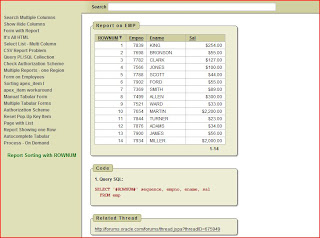
You can see that working in this example in my Demo Application.
A simple trick can help you to overcome this issue. Just escape the ApEx internal #ROWNUM# like this:
SELECT '#ROWNUM#' SEQUENCE, empno, ename, sal
  FROM emp;
and it will give you the right ROWNUM regardless of your sorting.

You can see that working in this example in my Demo Application.
Sunday, 29 June 2008
Pipelined Functions
The question in the forum was:
Usually, it is oposite. You want to show the list of users that match the criteria.
The solution for this problem is quite easy if you know how to use pipelined functions. This is a case where the pipelined functions shine. I created an example in my Demo Application showing how this can be done.

Basically, the pipelined function will create a row for all substrings returning no rows from the emp table, showing those substrings as rows.
I need to allow my users to type in a list of names and return the names that are not in a table.

1. User types [ Tom Joe Bob MIKE ] into a Text Area item named :P2_NAME_CHECK

2. A table named CUST contains two rows with TOM and Bob in the
   CUST_NAME column.

3. A report returns two rows JOE and MIKE.
Usually, it is oposite. You want to show the list of users that match the criteria.
The solution for this problem is quite easy if you know how to use pipelined functions. This is a case where the pipelined functions shine. I created an example in my Demo Application showing how this can be done.

Basically, the pipelined function will create a row for all substrings returning no rows from the emp table, showing those substrings as rows.
Textfield Item - Submitting the Page
Normaly, if there are page items of type "Text Field" they will not submit the page unless you change them to "Text Field (always submits page when Enter pressed)". If you have only one item on you page of type "Text Field" this behaviour changes and the page will always submit if you press "Enter". Sometimes, you don't want this to happen. Especially, if you have some javascript attached to your field. To avoid that you can use the following trick:
1. create another item on you page of type "Text Field",
2. in the "HTML Form Element Attributes" of that item put
The result is that the second item will not be displayed and the first item will not submit on pressing "Enter".
1. create another item on you page of type "Text Field",
2. in the "HTML Form Element Attributes" of that item put
style="display:none"
The result is that the second item will not be displayed and the first item will not submit on pressing "Enter".
Two Tabular Forms on one Page
Recently there have been several discussions in the forum regarding multiple tabular forms on one page. I thought it is easy if you know how to create one tabular form manually, you will be able to do it for any other number of those forms. However, many participants of the forum do not share my opinion. This is why I decided to create a very basic example showing how that works. You will find it in my Demo Application together with the required code. If you want to see all the details, you may apply for an account following the instructions on the login page of my Demo Application.

Have fun.

Have fun.
Saturday, 17 May 2008
Problems loading Oracle Forums in a browser?
I had this with my old laptop and thought that is my "overloaded" FireFox with all those extensions. However, that continued with my new notebook as well. Now, I noticed this is not only FireFox but also the same thing happens when I use Internet Explorer (which I use only then when I need to open the same ApEx application twice).
See the picture below. It looks like while loading the forum the page is not rendered completely. This behaviour is only there when using Oracle Forums and they happen in both cases - while loading the main page or a single thread. Therefor my question to all readers of this blog: have you ever noticed something like that? I have this from time to time regardless of the connection I use. Currently, I use DSL 16000.


See the picture below. It looks like while loading the forum the page is not rendered completely. This behaviour is only there when using Oracle Forums and they happen in both cases - while loading the main page or a single thread. Therefor my question to all readers of this blog: have you ever noticed something like that? I have this from time to time regardless of the connection I use. Currently, I use DSL 16000.

Monday, 12 May 2008
Limit or Extend a Datepicker in ApEx
I have received a couple of questions per email, similar to this one on limiting the value of a date picker item. That shows this is an issue that needs to be solved from the development team. Whereby this is an easy issue. If you look behind the code, you will se there are one procedure and one view involved. The procedure code is generating a small pop-up window showing a calendar based on the number of the years the view is returning. I managed to get that customized by doing the following:
First of all, create a package like this:
1.
2. GRANT EXECUTE ON limit_datepicker TO PUBLIC;
3. CREATE OR REPLACE PUBLIC SYNONYM limit_datepicker FOR <<your_schema>>.limit_datepicker;
To be able to limit the values the view returns you need to do the following:
1. log in a SYS
2. ALTER SESSION SET current_schema=FLOWS_030000 (yor flows schema, FLOWS_030000 in my case)
3.
The view will now return the same result for the standard date picker or the value you request if you use the custom date picker.
And finaly, create the following on your page, which will contain the date picker item, limiting the years to the values you determine;
1. Create a hidden item on your page (Page 1 in my case)
P1_SECURITY_GROUP_ID
with a source PL/SQL Expression or Function
htmldb_custom_auth.get_security_group_id
2. Create the javascript and put it in the header of your page. Please note, you need to take care of the parameters yourself - for example p_yyyy or p_mm:
You will need to replace the values to what you need (2007 to 2008 in my case).
3. Date-Picker Item (P1_DATE_FROM in my case) is a normal text item with the following code in the Post Element Text:

The downside of this approach is that you need to modify one of the apex views and take care you recreate it after the next update. I still didn't have time to find out why this doesn't work on XE. I will have a look into that issue soon and post the results here.
First of all, create a package like this:
1.
CREATE OR REPLACE PACKAGE limit_datepicker
AS
   x   NUMBER;
   y   NUMBER;

   FUNCTION get_x
      RETURN NUMBER;

   FUNCTION get_y
      RETURN NUMBER;

   PROCEDURE show_as_popup_calendar (
      p_request              IN   VARCHAR2 DEFAULT NULL,
      p_title                IN   VARCHAR2 DEFAULT NULL,
      p_yyyy                 IN   VARCHAR2 DEFAULT NULL,
      p_mm                   IN   VARCHAR2 DEFAULT NULL,
      p_dd                   IN   VARCHAR2 DEFAULT NULL,
      p_hh                   IN   VARCHAR2 DEFAULT NULL,
      p_mi                   IN   VARCHAR2 DEFAULT NULL,
      p_pm                   IN   VARCHAR2 DEFAULT NULL,
      p_element_index        IN   VARCHAR2 DEFAULT NULL,
      p_form_index           IN   VARCHAR2 DEFAULT NULL,
      p_date_format          IN   VARCHAR2 DEFAULT 'MM/DD/YYYY',
      p_bgcolor              IN   VARCHAR2 DEFAULT '#336699',
      p_white_foreground     IN   VARCHAR2 DEFAULT 'Y',
      p_application_format   IN   VARCHAR2 DEFAULT 'N',
      p_lang                 IN   VARCHAR2 DEFAULT NULL,
      p_application_id       IN   VARCHAR2 DEFAULT NULL,
      p_security_group_id    IN   VARCHAR2 DEFAULT NULL,
      p_start_year           IN   NUMBER DEFAULT 1919,
      p_end_year             IN   NUMBER DEFAULT 2050
   );
END limit_datepicker;
/

CREATE OR REPLACE PACKAGE BODY limit_datepicker
AS
   FUNCTION get_x
      RETURN NUMBER
   IS
   BEGIN
      RETURN limit_datepicker.x;
   END get_x;

   FUNCTION get_y
      RETURN NUMBER
   IS
   BEGIN
      RETURN limit_datepicker.y;
   END get_y;

   PROCEDURE show_as_popup_calendar (
      p_request              IN   VARCHAR2 DEFAULT NULL,
      p_title                IN   VARCHAR2 DEFAULT NULL,
      p_yyyy                 IN   VARCHAR2 DEFAULT NULL,
      p_mm                   IN   VARCHAR2 DEFAULT NULL,
      p_dd                   IN   VARCHAR2 DEFAULT NULL,
      p_hh                   IN   VARCHAR2 DEFAULT NULL,
      p_mi                   IN   VARCHAR2 DEFAULT NULL,
      p_pm                   IN   VARCHAR2 DEFAULT NULL,
      p_element_index        IN   VARCHAR2 DEFAULT NULL,
      p_form_index           IN   VARCHAR2 DEFAULT NULL,
      p_date_format          IN   VARCHAR2 DEFAULT 'MM/DD/YYYY',
      p_bgcolor              IN   VARCHAR2 DEFAULT '#336699',
      p_white_foreground     IN   VARCHAR2 DEFAULT 'Y',
      p_application_format   IN   VARCHAR2 DEFAULT 'N',
      p_lang                 IN   VARCHAR2 DEFAULT NULL,
      p_application_id       IN   VARCHAR2 DEFAULT NULL,
      p_security_group_id    IN   VARCHAR2 DEFAULT NULL,
      p_start_year           IN   NUMBER DEFAULT 1919,
      p_end_year             IN   NUMBER DEFAULT 2050
   )
   IS
   BEGIN
      limit_datepicker.x := p_start_year;
      limit_datepicker.y := p_end_year;
      wwv_flow_utilities.show_as_popup_calendar (p_request,
                                                 p_title,
                                                 p_yyyy,
                                                 p_mm,
                                                 p_dd,
                                                 p_hh,
                                                 p_mi,
                                                 p_pm,
                                                 p_element_index,
                                                 p_form_index,
                                                 p_date_format,
                                                 p_bgcolor,
                                                 p_white_foreground,
                                                 p_application_format,
                                                 p_lang,
                                                 p_application_id,
                                                 p_security_group_id
                                                );
   END;
END limit_datepicker;
/
2. GRANT EXECUTE ON limit_datepicker TO PUBLIC;
3. CREATE OR REPLACE PUBLIC SYNONYM limit_datepicker FOR <<your_schema>>.limit_datepicker;
To be able to limit the values the view returns you need to do the following:
1. log in a SYS
2. ALTER SESSION SET current_schema=FLOWS_030000 (yor flows schema, FLOWS_030000 in my case)
3.
CREATE OR REPLACE VIEW wwv_flow_years
AS
   SELECT     NVL (b.start_year - 1, 1918) + LEVEL
         FROM DUAL a,
              (SELECT limit_datepicker.get_x start_year
                 FROM DUAL) b,
              (SELECT limit_datepicker.get_y end_year
                 FROM DUAL) c
   CONNECT BY LEVEL < NVL ((c.end_year + 1) - (b.start_year - 1),
                           2051 - 1918)
The view will now return the same result for the standard date picker or the value you request if you use the custom date picker.
And finaly, create the following on your page, which will contain the date picker item, limiting the years to the values you determine;
1. Create a hidden item on your page (Page 1 in my case)
P1_SECURITY_GROUP_ID
with a source PL/SQL Expression or Function
htmldb_custom_auth.get_security_group_id
2. Create the javascript and put it in the header of your page. Please note, you need to take care of the parameters yourself - for example p_yyyy or p_mm:
<script type="text/javascript">
function f_popup_date(p_this)
{
   var item_name = $x(p_this).name
   var app_id = &APP_ID.
   var sec_gr_id = $x('P1_SECURITY_GROUP_ID').value

       w = open("limit_datepicker.show_as_popup_calendar" +
                   "?p_element_index=" + escape(item_name) +
                   "&p_form_index=" + escape('0') +
                   "&p_date_format=" + escape('DD-MON-RR') +
                   "&p_bgcolor=" + escape('#666666') +
                   "&p_dd=" + escape('') +
                   "&p_hh=" + escape('') +
                   "&p_mi=" + escape('') +
                   "&p_pm=" +
                   "&p_yyyy=" + escape('2008') +
                   "&p_lang=" + escape('en') +
                   "&p_application_format=" + escape('N') +
                   "&p_application_id=" + escape(app_id) +
                   "&p_security_group_id=" + escape(sec_gr_id) +
                   "&p_start_year=" + escape('2007') +
                   "&p_end_year=" + escape('2008') +
                   "&p_mm=" + escape('01'),
                   "winLov",
                   "Scrollbars=no,resizable=yes,width=258,height=210");
       if (w.opener == null)
         w.opener = self;
       w.focus();
}
</script>
You will need to replace the values to what you need (2007 to 2008 in my case).
3. Date-Picker Item (P1_DATE_FROM in my case) is a normal text item with the following code in the Post Element Text:
<a href="javascript:f_popup_date('P1_DATE_FROM');">
<img src="/i/asfdcldr.gif"
style="cursor:pointer;valign:bottom" /></a>

The downside of this approach is that you need to modify one of the apex views and take care you recreate it after the next update. I still didn't have time to find out why this doesn't work on XE. I will have a look into that issue soon and post the results here.
Wednesday, 30 April 2008
Cascading Select List in a Tabular Form
This is something the most of the ApEx Developers have a problem with. How do I create a cascading select list in a tabular form? There are several examples (also in my Demo Application) on how to do that in a simple form. However, there is only one example arround showing how this can be done - in Vikas application, but I don't like that approach. I have also been asked several times to create such an example. Here we go! In my Demo Application you will find a working example showing also how to create an update and delete process + some javascript for checking and highlighting of all rows in your tabular form:
http://htmldb.oracle.com/pls/otn/f?p=31517:176

This approach is using apex_item + the same javascript (ajax) code as for the "simple" cascading select list.
Apply for an account if you would like to see all of the code behind this example.
http://htmldb.oracle.com/pls/otn/f?p=31517:176

This approach is using apex_item + the same javascript (ajax) code as for the "simple" cascading select list.
Apply for an account if you would like to see all of the code behind this example.
Monday, 28 April 2008
XE Webfolder with Vista
If you work with Vista and would like to create a Web Folder according to this tipp from Dietmar Aust, you will not be successful. In Vista there are some changes made and the path described in the above post will give you a view only.
In Vista you need to do the following:
1. Open Windows Explorer and go to Menu Tools / Map Network Drive
2. There, you click on "Connect to a Web site that you can use to store your documents and pictures"
3. Click two times on "Next" (don't ask me why!)
4. Enter http://127.0.0.1:8080/i where it asks you for an Internet or Network address,
5. Enter system / password
6. Give your connection a name
7. Finish.
Now, the images directory will appear in your Windows Explorer under Webfolder:
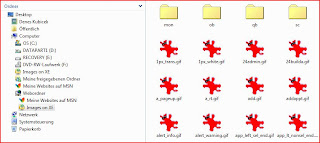
In Vista you need to do the following:
1. Open Windows Explorer and go to Menu Tools / Map Network Drive
2. There, you click on "Connect to a Web site that you can use to store your documents and pictures"
3. Click two times on "Next" (don't ask me why!)
4. Enter http://127.0.0.1:8080/i where it asks you for an Internet or Network address,
5. Enter system / password
6. Give your connection a name
7. Finish.
Now, the images directory will appear in your Windows Explorer under Webfolder:

Sunday, 6 April 2008
ApEx Training - München 02.06.2008 - 04.06.2008
Liebe ApEx-ler,
Unser nächstes Training - Fortgeschrittene Techniken aus der Praxis - wird in München im Arabella Sheraton Westpark Hotel stattfinden. Die Details für die Anmeldung findet Ihr auf Opal Consulting.
Wir versprechen (und halten):
- Interessante und neue Inhalte
- hohen Praxisbezug
- Kompetenz in Oracle und ApEx Themen
- Antworten auf alle Ihre Fragen
und freuen uns Euch dort begrüssen zu dürfen.
----------------------------------------------------------------------------------------------------------------------
Our next Training will be held in Munich from 02.06.2008 to 04.06.2008 in Arabella Sheraton Westpark Hotel. The details you can find on Opal Consulting. Please note that places are limited and there has been a great deal of interest in the training following the previous event in March 2008. We advise you to register a.s.a.p.
Unser nächstes Training - Fortgeschrittene Techniken aus der Praxis - wird in München im Arabella Sheraton Westpark Hotel stattfinden. Die Details für die Anmeldung findet Ihr auf Opal Consulting.
Wir versprechen (und halten):
- Interessante und neue Inhalte
- hohen Praxisbezug
- Kompetenz in Oracle und ApEx Themen
- Antworten auf alle Ihre Fragen
und freuen uns Euch dort begrüssen zu dürfen.
----------------------------------------------------------------------------------------------------------------------
Our next Training will be held in Munich from 02.06.2008 to 04.06.2008 in Arabella Sheraton Westpark Hotel. The details you can find on Opal Consulting. Please note that places are limited and there has been a great deal of interest in the training following the previous event in March 2008. We advise you to register a.s.a.p.
Tuesday, 1 April 2008
ApEx Training - followup
This was my first ApEx-only training. I can't remember when I last time spoke in front of that many people (at school perhaps). However, this was an amazing experience. ApEx is really something special - amazing people, exciting topics and a lot of enthusiasm. Also, there were 8 female attendees at our training which I think is great quote. Here some pictures from our training (actually, we were so busy that we managed to take only these two ;)):


The program schedule was quite well loaded and we didn't manage to elaborate on everything. Our schedule was also quite aggressive - training from 9 - 17.30 and QA Sessions from 19 to 21 (planned time - indeed it was 23 when we quit). Amazing to see 80% of the attendees sitting there at 7 in the evening preparing for the QA.
Tomorrow, we will post the details of our next training in Munich.


The program schedule was quite well loaded and we didn't manage to elaborate on everything. Our schedule was also quite aggressive - training from 9 - 17.30 and QA Sessions from 19 to 21 (planned time - indeed it was 23 when we quit). Amazing to see 80% of the attendees sitting there at 7 in the evening preparing for the QA.
Tomorrow, we will post the details of our next training in Munich.
Subscribe to:
Posts (Atom)