
Monday, 3 February 2014
APEX 5.0 - New Features - Sub Region - Region Position
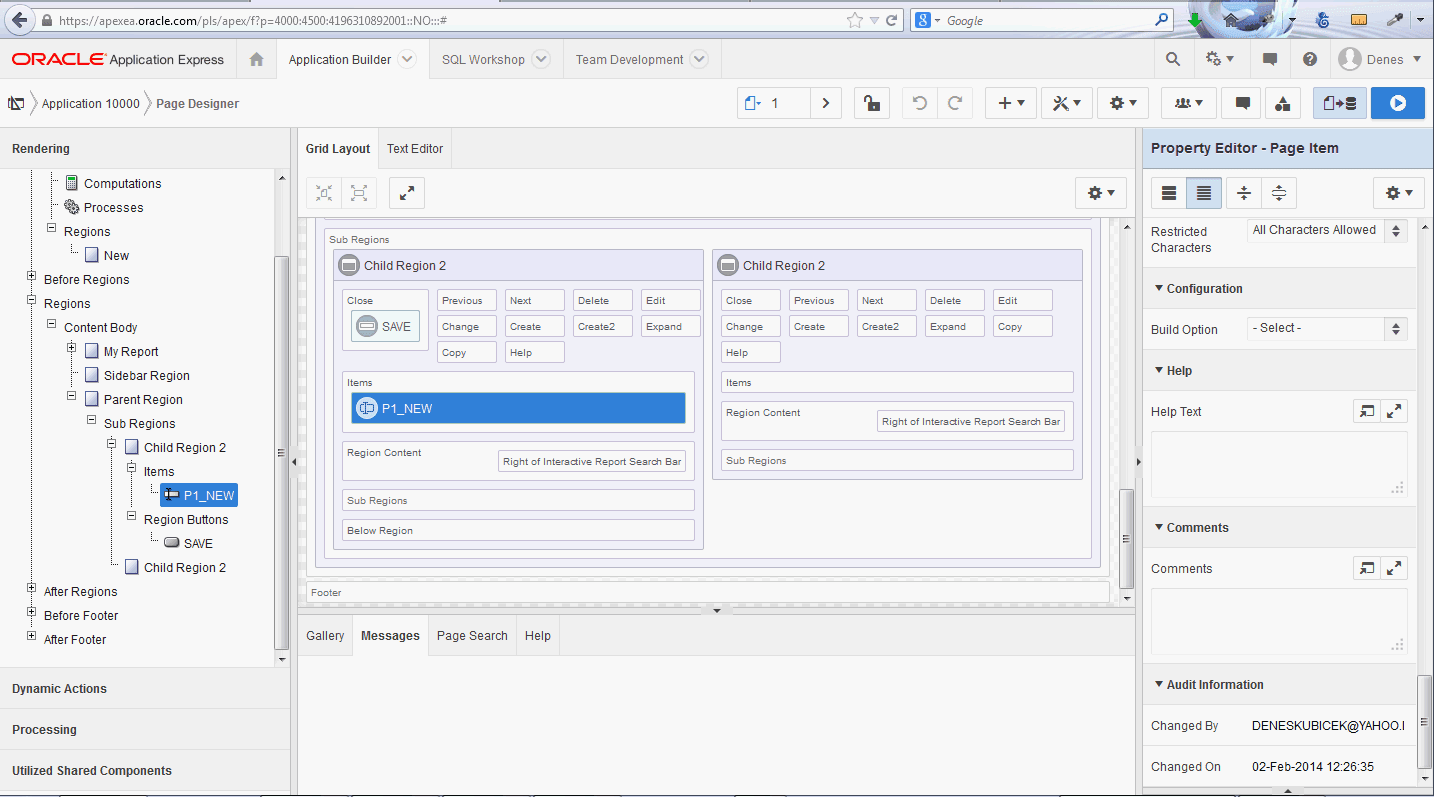
One of the first things I checked in APEX 5.0 EA was the region positioning of the sub regions. I was positively surprised to see that I can now position the regions next to each other as well. In earlier versions the only option was underneath. Having this possibility it will be much easier to create complex forms where you need to take care of positioning multiple items in more than one column. At the moment this is doable but somewhat tricky.


Sunday, 2 February 2014
APEX 5.0 - early adopter is cool
This is definitely the best APEX version ever. I just tested it and it took less than a couple of minutes to get used to it. You know how hard it is to accept major changes. This time it was easy. The changes made in the builder will for sure increase the productivity although this was never a weakness of APEX. There are of course some things missing (or I just couldn't find them) like how to create a simple form. Some features are still not implemented like workspace user management. Some things remained the same like a wizards for page creation. However, I can confirm that it is worth of requesting a workspace and starting to use it. It is simply cool.
This is how the page builder looks like:

And this is a result of my first test:

And here is the link: https://apexea.oracle.com/pls/apex/f?p=4000:1
Enjoy.
This is how the page builder looks like:
And this is a result of my first test:

And here is the link: https://apexea.oracle.com/pls/apex/f?p=4000:1
Enjoy.
Tuesday, 14 January 2014
APEX Training 2014 - Best Practices
Our next training will be held in Bensheim on 26th of May 2014. You can find the details here.
Die Erfolgreiche Trainingserie geht auch in diesem Jahr weiter. Dietmar Aust und ich organisieren ein weiteres Best Practice Training am 26.05.2014 in Bensheim. Diesmal findet das Training auf der Basis von APEX 4.2 statt. Nutzen Sie die Möglichkeit von Experten zu lernen und melden Sie sich an. Einen Link zu der Anmeldeseite finden Sie hier.

Die Erfolgreiche Trainingserie geht auch in diesem Jahr weiter. Dietmar Aust und ich organisieren ein weiteres Best Practice Training am 26.05.2014 in Bensheim. Diesmal findet das Training auf der Basis von APEX 4.2 statt. Nutzen Sie die Möglichkeit von Experten zu lernen und melden Sie sich an. Einen Link zu der Anmeldeseite finden Sie hier.

Sunday, 12 January 2014
Barcode Report
This example seems still to be interesting to some people in the community. The number of requests and questions I am getting regarding it forced me to update it. Now the rendering is using an application process instead of a public procedure - using public procedures in XE is somewhat tricky.


Thursday, 19 December 2013
Classic Report - Preserve Pagination after PPR
In this example you can see how easy it is to preserve report pagination after PPR. With a little jquery coding you can attach a function to the pagination request and this way "document" where the pagination goes. After a report refresh you may read those values and paginate back to where you were.


Tuesday, 17 December 2013
SQL Developer 4.0
I personally didn't like SQL Developer because of it's clumsy java interface and found TOAD much better. Now, the version 4.0 looks more professional, cleaner and nicer. The new look and feel has been improved a lot. You can now reorder editor tabs without any side effects. SQL Developer has a big advantage if you have to work on a device for which you have no administrative rights - it doesn't require an installation. It is almost perfect if there wouldn't be a funny logic for making it available. On the SQL Developer download page you can choose between several versions:
1. Windows 64-bit - zip file includes the JDK 7
2. Windows 32/64-bit
3. Mac OS X
4. Linux RPM
5. Other Platforms
Only the 64-bit version includes JDK. It is a mystery to me why the other installation versions do not include the same. If your system is a 32-bit only and you have no way to install anything, you will be faced with a problem. The 64-bit jdk will not run there. I helped myself with the following trick:
1. downloaded the jdk 7.0 from here
2. installed it on an another computer
3. copied the entire folder of the installation to the computer where I have no admin rights - jdk1.7.0_45 - and placed it into the SQL Developer folder
4. finally, I changed the sqldeveloper.conf file by changing the line for setting the java home
SetJavaHome D:\oracle_tools\sqldeveloper\4.0\sqldeveloper\jdk1.7.0_45
After this change it worked as expected.


1. Windows 64-bit - zip file includes the JDK 7
2. Windows 32/64-bit
3. Mac OS X
4. Linux RPM
5. Other Platforms
Only the 64-bit version includes JDK. It is a mystery to me why the other installation versions do not include the same. If your system is a 32-bit only and you have no way to install anything, you will be faced with a problem. The 64-bit jdk will not run there. I helped myself with the following trick:
1. downloaded the jdk 7.0 from here
2. installed it on an another computer
3. copied the entire folder of the installation to the computer where I have no admin rights - jdk1.7.0_45 - and placed it into the SQL Developer folder
4. finally, I changed the sqldeveloper.conf file by changing the line for setting the java home
SetJavaHome D:\oracle_tools\sqldeveloper\4.0\sqldeveloper\jdk1.7.0_45
After this change it worked as expected.


Wednesday, 4 December 2013
APEX Listener and Excel Upload
If you are using APEX Listener version 2.0, you can download a sample application here. In this application I am showing how to:
1. create an excel upload page
2. manage multiple excel sheets after upload
This new APEX Listener feature is great and I hope they will extend it to the other excel file formats - currently it works for .xls only. If you are using APEX 4.2.3 this will probably not work since there is a bug in that version of APEX.
So, the current limitations are:
1. xls files only
2. APEX 4.2.3 is buggy related to this feature
3. you can upload up to 49 columns since it is using APEX Collection and one column is used for excel tab names during the upload
In addition, you will need to add these four lines of code to the defaults.xml file:
<entry key="apex.excel2collection">true</entry> <entry key="apex.excel2collection.onecollection">true</entry> <entry key="apex.excel2collection.name">EXCEL_COLLECTION</entry> <entry key="apex.excel2collection.useSheetName">true</entry>

Enjoy.


1. create an excel upload page
2. manage multiple excel sheets after upload
This new APEX Listener feature is great and I hope they will extend it to the other excel file formats - currently it works for .xls only. If you are using APEX 4.2.3 this will probably not work since there is a bug in that version of APEX.
So, the current limitations are:
1. xls files only
2. APEX 4.2.3 is buggy related to this feature
3. you can upload up to 49 columns since it is using APEX Collection and one column is used for excel tab names during the upload
In addition, you will need to add these four lines of code to the defaults.xml file:
<entry key="apex.excel2collection">true</entry> <entry key="apex.excel2collection.onecollection">true</entry> <entry key="apex.excel2collection.name">EXCEL_COLLECTION</entry> <entry key="apex.excel2collection.useSheetName">true</entry>

Enjoy.


Tuesday, 8 October 2013
APEX and Session State Protection
Prior to configuring Session State Protection in your applications you need to be aware of one important thing. Setting it up and configuring the settings will change the settings for all the items in your application - even if the items were protected before that change using some other protection methods. Deactivating the protection will again remove the protection completely. At the end this could mean a lot of work - get a backup and manually restore the original settings.


Monday, 2 September 2013
Meine Präsentation bei Orbit - Oracle Day
Am 18.09.2013 organisiert die Firma Orbit eine Verantstalltung mit dem Namen "Oracle Day". Der Titel meiner Präsentation ist "APEX – Applikationen im Expressverfahren". Die Agenda ist ziemlich interessant und umfasst viele Themen bezüglich Backup-Strategien, APEX, Geodatenverarbeitung und Business Intelligence-Lösungen. Die Agenda kann hier gefunden werden. Die Veranstaltung ist selbstverständlich kostenlos. Also, meldet euch an und wir sehen uns dort.


Sunday, 25 August 2013
APEX Presentations September and October
September and October 2013 are going to be tough. I am supposed to hold five presentations all together. Here is the schedule and the presentation titles:
04.09.2013 - MT AG (Ratingen, Germany) - "My Demo Application - die wohl populärste APEX Demo Anwendung"
18.09.2013 - Orbit (Bonn, Germany) - "APEX - Applikationen im Expressverfahren erstellen"
19.09.2013 - DOAG Regional (Mannheim, Germany) - "APEX, Installation, Bereitstellung, Schnittstellen und AddOns richtig verwalten"
22.10.2013 - SlOUG Slowenian Oracle User Group Conference (Ljubljana, Slowenia) - "Ten things you need to know about APEX – APEX Features, Deployment and Application Programming"
24.10.2013 - HROUG Croatian Oracle User Group Conference (Rovinj, Croatia) - "APEX 4.2 – Installation, Deployment and Application Management"
04.09.2013 - MT AG (Ratingen, Germany) - "My Demo Application - die wohl populärste APEX Demo Anwendung"
18.09.2013 - Orbit (Bonn, Germany) - "APEX - Applikationen im Expressverfahren erstellen"
19.09.2013 - DOAG Regional (Mannheim, Germany) - "APEX, Installation, Bereitstellung, Schnittstellen und AddOns richtig verwalten"
22.10.2013 - SlOUG Slowenian Oracle User Group Conference (Ljubljana, Slowenia) - "Ten things you need to know about APEX – APEX Features, Deployment and Application Programming"
24.10.2013 - HROUG Croatian Oracle User Group Conference (Rovinj, Croatia) - "APEX 4.2 – Installation, Deployment and Application Management"
Thursday, 8 August 2013
Tuesday, 16 July 2013
Oracle APEX 4.2 New Features und Tipps aus der Praxis
Unser nächster Kurs wird im November, am 11.11 und 12.11 in Bensheim stattfinden. Das Thema ist ziemlich spannend - APEX 4.2 New Features und unsere Erfahrungen aus der Praxis mit der neuen Version. Wir werden diesmal sehr viel über dem APEX Listener, Einsatz von jQuery und über Restfull Web Services reden und natürlich, praktisch üben. Dieser Link informiert Sie über alle weiteren Details zum Kurs.

Thursday, 6 June 2013
Create a Success Message using Dynamic Action - Second
You can extend this simple example by adding a counter to it and close it after the specified number of seconds:
Using jQuery this is quite easy to acomplish.

var my_counter = 5;

var success_message = $('#P299_MESSAGE').val() + '<br/>'
+ 'This message will close in ' +
'<span id="my_sec">' + my_counter + '</span>' + ' seconds.';
$('.t10messages').empty();
$('.t10messages').append(<div class="t10success" style="display: none;">
</div>
');
$('.t10success').append(success_message);
$('.t10success').fadeIn(1000);

var time_in_seconds = setInterval(function() {

my_counter--;

$('#my_sec').empty();
$('#my_sec').append(my_counter);

if (my_counter == 0) {
    clearInterval(time_in_seconds);
    $('.t10success').fadeOut(1000);
    }
}, 1000);
Using jQuery this is quite easy to acomplish.

Thursday, 23 May 2013
Create a Success Message using Dynamic Action
This simple example is showing how to create a success message using dynamic actions. One thing needs to be mentioned though. The last one of the three actions depends on your current template:
The best thing is either to open the template and have a look at the structure of the success message part or to use firebug and inspect the HTML structure on your page.
Enjoy.

var success_message = $('#P299_MESSAGE').val();

$('.t10messages').empty();
$('.t10messages').append('<div class="t10messages"><div class="t10success"
style="display: block;"></div></div>');
$('.t10success')
.append(success_message)
.slideDown('slow');
The best thing is either to open the template and have a look at the structure of the success message part or to use firebug and inspect the HTML structure on your page.
Enjoy.

Wednesday, 22 May 2013
Enable and Disable a Checkbox in a Tabular Form
This simple example is showing how to use a simple checkbox column in a tabular form to enable/disable or check/uncheck another checkbox column.


Friday, 17 May 2013
APEX Tabular Form - Instant Update
Yesterday an interesting question regarding tabular forms, collections and instant updates was asked in the Oracle APEX Forum. This example in my Demo Application shows how you can create a tabular form based on a collection and update this collection instantly. The whole example consists of three main parts:
1. save changes instantly
2. add rows and
3. delete rows
The whole code and the steps required to get it working are explained in the Code section.
Enjoy.

1. save changes instantly
2. add rows and
3. delete rows
The whole code and the steps required to get it working are explained in the Code section.
Enjoy.

Wednesday, 15 May 2013
Getting Interactive Report Query
I know this is nothing new but I had a hard time to find out how to get the SQL of the currently viewed Interactive Report. In one of my projects I needed the exact query including the filtered values and sorting in order to save the data into a PL/SQL collection and process it further. I tried using the existing IR Application Views but those do not provide all the information I needed. I stumbled upon this documentation page
http://docs.oracle.com/cd/E37097_01/doc/doc.42/e35127/apex_ir.htm#BABEFDJE
but was confused by the statement for getting the IR Query:
If you run this statement, you will receive a concatenated string of binds used in for the filtering and the corresponding values and not the actual query (it is just not printed out). In addition to that, you need to combine this statement with the one for getting the last viewed report id:
After talking to Patrick Wolf I realized that this statement delivers almost everything you need in order to get the complete query. I combined the two statements and created a function which you can use to get a query for any of your interactive reports including replaced binds. The function code is:
Enjoy.
http://docs.oracle.com/cd/E37097_01/doc/doc.42/e35127/apex_ir.htm#BABEFDJE
but was confused by the statement for getting the IR Query:
DECLARE
   l_report  apex_ir.t_report;
   l_query   varchar2(32767);
BEGIN
    l_report := APEX_IR.GET_REPORT (
                    p_page_id   => 1,
                    p_region_id => 2505704029884282,
                    p_report_id => 880629800374638220);
    l_query := l_report.sql_query;
    for i in 1..l_report.binds.count
    loop
        dbms_output.put_line(i||'. '||
                             l_report.binds(i).name||
                             '='||l_report.binds(i).value);
    end loop;
END;
If you run this statement, you will receive a concatenated string of binds used in for the filtering and the corresponding values and not the actual query (it is just not printed out). In addition to that, you need to combine this statement with the one for getting the last viewed report id:
DECLARE
    l_report_id number;
BEGIN
    l_report_id := APEX_IR.GET_LAST_VIEWED_REPORT_ID (
        p_page_id   => 1,
        p_region_id => 2505704029884282);
END;
After talking to Patrick Wolf I realized that this statement delivers almost everything you need in order to get the complete query. I combined the two statements and created a function which you can use to get a query for any of your interactive reports including replaced binds. The function code is:
CREATE OR REPLACE FUNCTION get_report_sql (
   p_app_id     IN   NUMBER,
   p_page_id    IN   NUMBER,
   p_all_cols   IN   BOOLEAN DEFAULT TRUE
)
   RETURN VARCHAR2
IS
   v_report_id   NUMBER;
   v_region_id   NUMBER;
   v_report      apex_ir.t_report;
   v_query       VARCHAR2 (32767);
   v_column      VARCHAR2 (4000);
   v_position    NUMBER;
BEGIN
   SELECT region_id
     INTO v_region_id
     FROM apex_application_page_regions
    WHERE application_id = p_app_id
      AND page_id = p_page_id
      AND source_type = 'Interactive Report';

   v_report_id :=
      apex_ir.get_last_viewed_report_id (p_page_id        => p_page_id,
                                         p_region_id      => v_region_id
                                        );
   v_report :=
      apex_ir.get_report (p_page_id        => p_page_id,
                          p_region_id      => v_region_id,
                          p_report_id      => v_report_id
                         );
   v_query := v_report.sql_query;

   FOR i IN 1 .. v_report.binds.COUNT
   LOOP
      v_query :=
         REPLACE (v_query,
                  ':' || v_report.binds (i).NAME,
                  '''' || v_report.binds (i).VALUE || ''''
                 );
   END LOOP;

   IF p_all_cols
   THEN
      FOR c IN (SELECT   *
                    FROM apex_application_page_ir_col
                   WHERE application_id = p_app_id AND page_id = p_page_id
                ORDER BY display_order)
      LOOP
         v_column := v_column || ', ' || c.column_alias;
      END LOOP;

      v_column := LTRIM (v_column, ', ');
      v_position := INSTR (v_query, '(');
      v_query := SUBSTR (v_query, v_position);
      v_query := 'SELECT ' || v_column || ' FROM ' || v_query;
   END IF;

   RETURN v_query;
EXCEPTION
   WHEN OTHERS
   THEN
      v_query := SQLERRM;
      RETURN v_query;
END get_report_sql;
You can call this function in your application or in a PL/SQL package run from an application session like this:
DECLARE
   v_sql   VARCHAR2 (4000);
BEGIN
   v_sql := get_report_sql (:app_id, :app_page_id, FALSE);
   HTP.prn (v_sql);
END;
Setting the parameter
p_all_cols
to TRUE would export all columns used in the IR SQL.
Enjoy.
Friday, 26 April 2013
Moving Elements in a Cascading Shuttle
Since APEX 4.0 cascading feature is a part of the standard. Not only a "normal" select list can be cascading but also a shuttle element. In this example I am showing how to filter a shuttle box and move the filtered values to the right side using just one click (change of the first select list).


CLOB Plugin
There is a new plugin available which makes it possible to save and render contents larger than 32k. This limitation was one of the most critical in APEX. I remember several projects where we had to create workarrounds to solve that issue. Now, there is no need to write your own code any more. Dan McGhan created a new plugin for that and you can find it here:
CLOB Load Plugin
The current help regarding asynchronous submit is missing a detail at this point:
"Next, create one more dynamic action. Set Event to CLOB(s) Submit Complete [Enkitec CLOB Load] and set the action to Execute JavaScript Code. Set the Code field to something like the following:
It should also say that the "Selection Type" of the corresponding Dynamic Action is "DOM Object" and the "DOM Object" is "document".
Also, you can leave the hidden element out and modify the javascript call to:
Try it out. It works great.


CLOB Load Plugin
The current help regarding asynchronous submit is missing a detail at this point:
"Next, create one more dynamic action. Set Event to CLOB(s) Submit Complete [Enkitec CLOB Load] and set the action to Execute JavaScript Code. Set the Code field to something like the following:
doSubmit(v('PX_MY_HIDDEN_ITEM'));"It should also say that the "Selection Type" of the corresponding Dynamic Action is "DOM Object" and the "DOM Object" is "document".
Also, you can leave the hidden element out and modify the javascript call to:
doSubmit('SAVE');Try it out. It works great.


Thursday, 25 April 2013
APEX Deep Linking, Authentication and Special Characters
It seem that there is a bug in APEX regarding deep linking, authentication and parsing special characters. See this thread. In this example I am showing a simple workarround which could be also applied in other similar situations where you need to transfer information using URL.


Subscribe to:
Comments (Atom)