
Monday, 24 May 2010
Save Changes before Exiting
One of my customers wants to replace some Forms applications using APEX. One of the critical issues was the possibility to warn the user before exiting the existing form (switching tabs, closing browser window or tab or simply using the back button). In this example in my Demo Application I created a proof of concept using some older threads and demos. The solution is quite neat since there is almost no hardcoding and it works in every case while trying to move from the form. One of the important things was how to get that button for saving changes work, so it doesn't trigger the alert but does save the changes.


Thursday, 11 March 2010
Tabular Form - Preserve Changes
In our last training (08.03-10.03.2010) there was an interesting question on how to preserve the changes made in a tabular form while paginating through it. The requirement was also to save all the changes made independant of the visible set of rows. This problem can be solved using apex collections. This page in my Demo Application holds a working example including the full description of the code.


Saturday, 13 February 2010

Preventing Duplicate Entries in a Tabular Form
This may sound trivial but the question is one of the frequently asked question in the forum. I just created an example showing how to check a tabular form on duplicate entries prior to saving the new added rows. You will find the example here. Try adding some rows and enter an already existing name for the ename.


Tuesday, 2 February 2010
APEX Training in Bensheim - die Uhr tickt
Liebe APEX-ler, auch dieses Jahr organisieren Dietmar und ich ein weiteres Training zum Thema APEX aus der Praxis. Der Termin ist 08.03 - 10.03 im Aleehotel Europa in Bensheim an der Bergstrasse. Wenn ihr auf der Suche nach einem APEX-Training seid, in dem nicht nach einem empno, deptno Muster unterrichtet wird und wo der Dozent APEX nicht nur aus den Unterlagen kennt, sondern in komplexen Projekten selbst eingesetzt hat, dann seid ihr bei uns richtig. Eine Anmeldung zum Training findet ihr hier, auf Opal-Consulting.de.


Same procedure as every year - APEX Stammtisch
Dietmar aust und ich werden am 22.02.2010 um 19 Uhr unseren jährlichen APEX Stammtisch in Siegburg organisieren. Falls ihr Lust habt mit uns und anderen Teilnehmern über APEX zu reden so könnt ihr euch hier anmelden.


Wednesday, 23 December 2009
My (our) first book
As Dietmar Aust already wrote in his blog, our first book was published yesterday. We are currently the No. 1 under Oracle books on amazon.de. Although, this is changing every hour. The book is currently available only in German. Our goal was to write a book about the best practices we have developed through the years.

Merry Christmas to all of you.
Denes Kubicek
Merry Christmas to all of you.
Denes Kubicek
Sunday, 8 November 2009
APEX Kurs März 2010
Dietmar und ich werden einen weiteren Kurs im März 2010 organisieren. In Kürze werden wir die Informationen darüber auf unserer Seite veröffentlichen.

Thursday, 1 October 2009
Update Multiple Values in a Tabular Form using PopUp
In this posting and the corresponding example I showed how to compute columns in a tabular form row using a select list. Sometimes you can have a requirement to use more than one parameter (configurator) to do a preselection. In that case you would need to use a popup window. I was asked how that could be done and I created a slightly modified example in my demo application. The only difference is that:
- you need to tell the popup page the row number you would like to compute
- you need to call the ajax function out of the popup window using window.opener function

- you need to tell the popup page the row number you would like to compute
- you need to call the ajax function out of the popup window using window.opener function
Wednesday, 2 September 2009
The Power of the Apex Repository
We all know about the apex views but hardly use them. Today, I answered two questions in the oracle Forum where the solution was related to the apex views. The first question was on how to create a report with all the csv links for all the reports in an application:
http://forums.oracle.com/forums/thread.jspa?threadID=952151
The second question was on how to provide a generic solution for a page help functionality:
http://forums.oracle.com/forums/thread.jspa?threadID=952469
Basically, the usage of apex views provides a simple two-step solution which doesn't require any maintanance.
In my demo application, you will find the corresponding examples:
Report on all csv links
Help page
Try it out.

http://forums.oracle.com/forums/thread.jspa?threadID=952151
The second question was on how to provide a generic solution for a page help functionality:
http://forums.oracle.com/forums/thread.jspa?threadID=952469
Basically, the usage of apex views provides a simple two-step solution which doesn't require any maintanance.
In my demo application, you will find the corresponding examples:
Report on all csv links
Help page
Try it out.

Thursday, 27 August 2009
Renaming Page Items
I am using Firefox for development of Apex applications. I have my builder open in one tab and the application in the next one. As soon as I make a change I would switch to the application tab and see the results after reloading or submiting the page. That is quite practical and saves a lot of clicks. Couple of days ago I was developing an application and had to rename a page item. This item was involved in some page computations and after renaming it the page didn't work the way I expected. I spent probably an hour trying to understand why. I changed my code couple of times withouth success. Then it came to my mind that I had seen this before. I logged out, logged in again and my code suddenly worked. So, this is just a small tip to first logout after renaming page items. It could save you a lot of time (and nerves) if you remember it.


Friday, 21 August 2009
Validations using Ajax
I posted about this in October 2008 but in different context. This example in my Demo Application shows how to use Ajax for item validation. I use this method in some cases where I can't allow the page to be submited but have to inform the user before he hits the submit button. Also, if user enters something invalid, it will overwrite that with a previous valid value.


Thursday, 20 August 2009
Become a better Apex Developer
We are just under 1 month away from the next training, kicking off 21st of September in Aleehotel Europa in Bensheim. It is time for the "late" birds to sign up for the training.
Unser Training beginnt am 21.09.2009 in Bensheim - Allehotel Europa. Es ist Zeit sich anzumelden. Es sind diesmal einige Plätze frei im Vergleich zu den letzten Trainings. Möglicherweise sind das die Auswirkungen dieser Krise, von der ständig erzählt wird. Und wenn es tatsächlich eine geben sollte, dann ist das die Zeit, die man nutzen sollte nach vorne zu schauen und sich für die guten Zeiten vorzubereiten. Also, meldet euch...

Unser Training beginnt am 21.09.2009 in Bensheim - Allehotel Europa. Es ist Zeit sich anzumelden. Es sind diesmal einige Plätze frei im Vergleich zu den letzten Trainings. Möglicherweise sind das die Auswirkungen dieser Krise, von der ständig erzählt wird. Und wenn es tatsächlich eine geben sollte, dann ist das die Zeit, die man nutzen sollte nach vorne zu schauen und sich für die guten Zeiten vorzubereiten. Also, meldet euch...
Tuesday, 18 August 2009
Search and Edit Form with Report
It is easy to create a form with a report in order to drill-down and modify or create records. It would be great if Apex would have a wizard for creating a form which would give us a possibility not only to edit and create records but also to search on those. In this small example in my Demo Application you can see how to do that manually. This example shows several things:
- how to create a manual form
- how to create a manual fetch process
- how to ensure data integrity using checksum
- how to create a form for editing and searching data
- how to drill down on a record set returned by a search without loosing it

Enjoy.
- how to create a manual form
- how to create a manual fetch process
- how to ensure data integrity using checksum
- how to create a form for editing and searching data
- how to drill down on a record set returned by a search without loosing it

Enjoy.
Sunday, 14 June 2009
Use Lightbox 2 in Apex
Following this thread I was wondering how easy it is to incorporate the Lightbox 2 plugin into Apex on apex.oracle.com. You can see the results here in my Demo Application.


Tabular Forms - Autofill
Tabular Forms are used to manage master-detail dependencies. Usually for creating applications like:
- Order Management or
- Quote Management
For order or a quote management you would create a simple form to manage your header data. Tabular form would be used for order lines having hidden fileds for primary key and foreign key (order primary key). Order lines are usually items comming from an item master table. Sometimes, these line items are available through a select list and the most of the information you need in a tabular form is already available and could be filled automatically:
- item description
- price
- quantity (default 1)
- other item properties
In this example in my Demo Application you can see how that can be done.

Selecting a product from the list would use Ajax to get the related information from the item master table for the selected product_id.
An on demand process would generate an xml stream and send it back to the page.
<body>
<desc>this xml genericly sets multiple items</desc>
<item id="f32_2">JavaScript: The Definitive Guide</item>
<item id="f33_2">31.49</item>
<item id="f34_2">David Flanagan</item>
<item id="f35_2">1</item>
</body>
A piece of javascript code would loop through that xml string and assign the values returned to the specified items in the tabular form.

- Order Management or
- Quote Management
For order or a quote management you would create a simple form to manage your header data. Tabular form would be used for order lines having hidden fileds for primary key and foreign key (order primary key). Order lines are usually items comming from an item master table. Sometimes, these line items are available through a select list and the most of the information you need in a tabular form is already available and could be filled automatically:
- item description
- price
- quantity (default 1)
- other item properties
In this example in my Demo Application you can see how that can be done.

Selecting a product from the list would use Ajax to get the related information from the item master table for the selected product_id.
An on demand process would generate an xml stream and send it back to the page.
<body>
<desc>this xml genericly sets multiple items</desc>
<item id="f32_2">JavaScript: The Definitive Guide</item>
<item id="f33_2">31.49</item>
<item id="f34_2">David Flanagan</item>
<item id="f35_2">1</item>
</body>
A piece of javascript code would loop through that xml string and assign the values returned to the specified items in the tabular form.

Thursday, 4 June 2009
How to Debug Ajax and On Demand Processes
I am getting several emails every week regarding one the same issue - Ajax and On Demand Process. In the most of the cases there is a problem with the On Demand Process code. Unfortunatelly Apex is not going to compile your code once you save it. If there is an error in your code the results will not be as expected. On the other side it is quite easy to debug that:
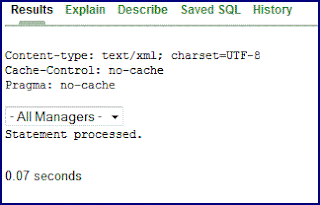
1. Try running your code in SQL Workshop - if your process is supposed to generate an XML file for a select list, you should see a select list if the code is O.K.
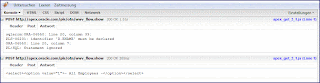
2. Use Firefox and download Firebug. Using Firebug you will be able to immediatelly see the results of the On Demand Process you created. Just open the Console and run your process:
3. Be carefull with naming of your On Demand Process - the name of your process in the javascript has to exactly match the name of the process in application processes. Using Firefox and Firebug will help to find that out:

4. Javascript is using htmldb_Get function to call your process the same way you would do that by typing it in the browser address bar - having a blank character there would retreive no results. That means that thhe part of the javascript code
equals to
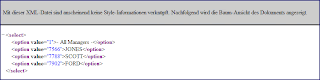
5. This would also mean that you can test your process using a simple link in your browser:
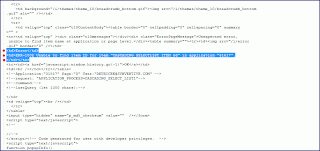
6. Make sure to name your application and page items correctly in the javascript part of the code. If your misstype a name no explicit error message will be issued. However, using Firefox and Firebug you will see a lot of javascript code in the Console and eventually find an error like displayed in the following screenshot:
7. Finaly, opening the "Post" Tab in Firebug, you will get an overview of your main parameters:

Enjoy debugging your ajax code.
1. Try running your code in SQL Workshop - if your process is supposed to generate an XML file for a select list, you should see a select list if the code is O.K.

2. Use Firefox and download Firebug. Using Firebug you will be able to immediatelly see the results of the On Demand Process you created. Just open the Console and run your process:

3. Be carefull with naming of your On Demand Process - the name of your process in the javascript has to exactly match the name of the process in application processes. Using Firefox and Firebug will help to find that out:

4. Javascript is using htmldb_Get function to call your process the same way you would do that by typing it in the browser address bar - having a blank character there would retreive no results. That means that thhe part of the javascript code
htmldb_Get(null,html_GetElement('pFlowId').value,
'APPLICATION_PROCESS=CASCADING_SELECT_LIST1',0);
get.add('CASCADING_SELECTLIST_ITEM_1',pThis.value);
equals to
f?p=&APP_ID.:0:&SESSION.:APPLICATION_PROCESS=CASCADING_SELECT_LIST1:
NO::CASCADING_SELECTLIST_ITEM_1:30
5. This would also mean that you can test your process using a simple link in your browser:

6. Make sure to name your application and page items correctly in the javascript part of the code. If your misstype a name no explicit error message will be issued. However, using Firefox and Firebug you will see a lot of javascript code in the Console and eventually find an error like displayed in the following screenshot:

7. Finaly, opening the "Post" Tab in Firebug, you will get an overview of your main parameters:

Enjoy debugging your ajax code.
Magic Page 0
In this posting I explained how to overwrite css rules using page header text or a conditional region. Something similar is also possible using the page 0. One of my customers asked me to create a page template in a corporate layout which they could use for their future applications. The only difference between the applications would be the image they display in the page header. The customers also had a mix of different browsers starting with IE6 over IE7 and Firefox. There were two problems I was faced with:
1. how to easily apply / change the image displayed in the header of the application
2. different browsers (IE6) would interpret my css code differently than the other browsers
I solved the problem in the following way:
1. created a page 0
2. created a "No Template" Region on the page
3. added the following code to the region source
The style part of the code would display the custom image. The javascript part would overwrite the style for the navigationArea if IE6 is used to view the page. Once they create a new application the only thing that needs to be done is to copy the page 0 from one of the existing applications and change the image name.

1. how to easily apply / change the image displayed in the header of the application
2. different browsers (IE6) would interpret my css code differently than the other browsers
I solved the problem in the following way:
1. created a page 0
2. created a "No Template" Region on the page
3. added the following code to the region source
<style type="text/css">
.top_header{background-image:
url(#IMAGE_PREFIX#themes/theme_basf/Sorp2.gif);
background-repeat: no-repeat;
background-position: 290px -45px;
background-color:#BFD0F4;}

.basf01overlapping{background-image:
url(#IMAGE_PREFIX#themes/theme_basf/Sorp2.gif);
background-repeat: no-repeat;
background-position: 290px -15px;}

</style>


<!--[if gte IE 6]>
<style type="text/css">
#navigationArea{width:99%;}
</style>
<![endif]-->
The style part of the code would display the custom image. The javascript part would overwrite the style for the navigationArea if IE6 is used to view the page. Once they create a new application the only thing that needs to be done is to copy the page 0 from one of the existing applications and change the image name.

Tuesday, 2 June 2009
Function Returning Links
In Apex you can create links out of your columns in a report. What you currently can't do is to put a condition behind this link and generate it upon that condition - if there is a link then it is there for all the rows. The only workarround for this is to create the link in your SQL. In that case your SQL may look quite clumsy and hard to read. Something like this:
The solution for this problem you can find here. Back in 2006 I created a function for generating links. This function can do the following for you:
- create a link based on a target page you provide, withouth having to code a full apex link,
- replace the link with an image if desired,
- sort the links based on any columns in your source,
- open the target page in the same window or in a popup window,
- add a request to your link,
- reset pagination if required,
- add a checksum to your link.
At the end, your query looks much better if you use that function:

SELECT CASE
          WHEN deptno = 10
             THEN    '<a href="javascript:popUp2('''
                  || 'f?p=&APP_ID.:500:&SESSION.::&DEBUG.::'
                  || 'P500_DEPTNO:'
                  || deptno
                  || ''', 700, 700);">'
                  || '<img src="#IMAGE_PREFIX#gobut.gif">'
                  || '</a>'
          WHEN deptno = 20
             THEN    '<a href="javascript:popUp2('''
                  || 'f?p=&APP_ID.:501:&SESSION.::&DEBUG.::'
                  || 'P501_DEPTNO:'
                  || deptno
                  || ''', 700, 700);">'
                  || '<img src="#IMAGE_PREFIX#go_search.gif">'
                  || '</a>'
          ELSE    '<a href="javascript:popUp2('''
               || 'f?p=&APP_ID.:502:&SESSION.::&DEBUG.::'
               || 'P502_DEPTNO:'
               || deptno
               || ''', 700, 700);">'
               || '<img src='
               || '"#WORKSPACE_IMAGES#go_button.gif">'
               || '</a>'
       END LINK,
       ename, job, hiredate
  FROM emp
The solution for this problem you can find here. Back in 2006 I created a function for generating links. This function can do the following for you:
- create a link based on a target page you provide, withouth having to code a full apex link,
- replace the link with an image if desired,
- sort the links based on any columns in your source,
- open the target page in the same window or in a popup window,
- add a request to your link,
- reset pagination if required,
- add a checksum to your link.
At the end, your query looks much better if you use that function:
SELECT CASE
          WHEN deptno = 10
             THEN return_link_fn (p_page         => 500,
                                  p_item         => 'P500_DEPTNO',
                                  p_value        => deptno,
                                  p_image_n      => 'gobut.gif'
                                 )
          WHEN deptno = 20
             THEN return_link_fn (p_page         => 501,
                                  p_item         => 'P501_DEPTNO',
                                  p_value        => deptno,
                                  p_image_n      => 'go_search.gif'
                                 )
             ELSE return_link_fn (p_page         => 502,
                                  p_item         => 'P502_DEPTNO',
                                  p_value        => deptno,
                                  p_image_n      => 'go_button.gif'
                                 )
       END LINK,
       ename, job, hiredate
  FROM emp

Monday, 1 June 2009
Applying CSS Conditionally
It may happen that you have an exception on one or more of your pages where your styling deviates from standard. In addition to that, you may want to apply your style conditionally. You have several choices in order to solve that problem:
1. make changes to your css file
2. create a css file within your workspace and reference it in your page template
3. create an additional template for your new style
However, this reqiures severals steps and could be a problem in some cases:
- you are not managing your HTTP Server and your dba's need months in order to accept such a small change
- you need to make changes to your page templates
- you need to create an additional template (region template, report template, ...)
Sometimes you need to go that way but there are also situations where you could solve that as in this example in my Demo Application. Using Firefox and Web Developer Toolbar you can easily find out the classes and their properties referenced in your template. You can adjust those properties to whatever you need and put that code into the header text of your page:
<style>
.t10ReportsRegion .t10RegionBody {background-color:#E2E5EA;}
.t10ReportsRegion .t10ButtonHolder {background-color:#E2E5EA;}
</style>
and the style will be applied only on that particular page. This will overwrite the style applied through the class with the same name in your css file.
If you need to apply your style conditionally, you can do the following:
1. create a region with the highest sequence and do not apply any template to it,
2. put your code in the region source of that region
3. change the region to render conditionally

1. make changes to your css file
2. create a css file within your workspace and reference it in your page template
3. create an additional template for your new style
However, this reqiures severals steps and could be a problem in some cases:
- you are not managing your HTTP Server and your dba's need months in order to accept such a small change
- you need to make changes to your page templates
- you need to create an additional template (region template, report template, ...)
Sometimes you need to go that way but there are also situations where you could solve that as in this example in my Demo Application. Using Firefox and Web Developer Toolbar you can easily find out the classes and their properties referenced in your template. You can adjust those properties to whatever you need and put that code into the header text of your page:
<style>
.t10ReportsRegion .t10RegionBody {background-color:#E2E5EA;}
.t10ReportsRegion .t10ButtonHolder {background-color:#E2E5EA;}
</style>
and the style will be applied only on that particular page. This will overwrite the style applied through the class with the same name in your css file.
If you need to apply your style conditionally, you can do the following:
1. create a region with the highest sequence and do not apply any template to it,
2. put your code in the region source of that region
3. change the region to render conditionally

Subscribe to:
Comments (Atom)